If you’ve ever tried reading a minified API response by eye, you know how painful it gets. One long line, no indentation, nested objects buried inside nested objects — it’s basically unreadable.
That’s the main reason I built a JSON Formatter tool. Paste your JSON in, hit format, and it immediately becomes something a human can actually parse.
This post walks through why JSON formatting matters in practice, and covers a few real scenarios where having a formatter nearby saves time.
What Is JSON?
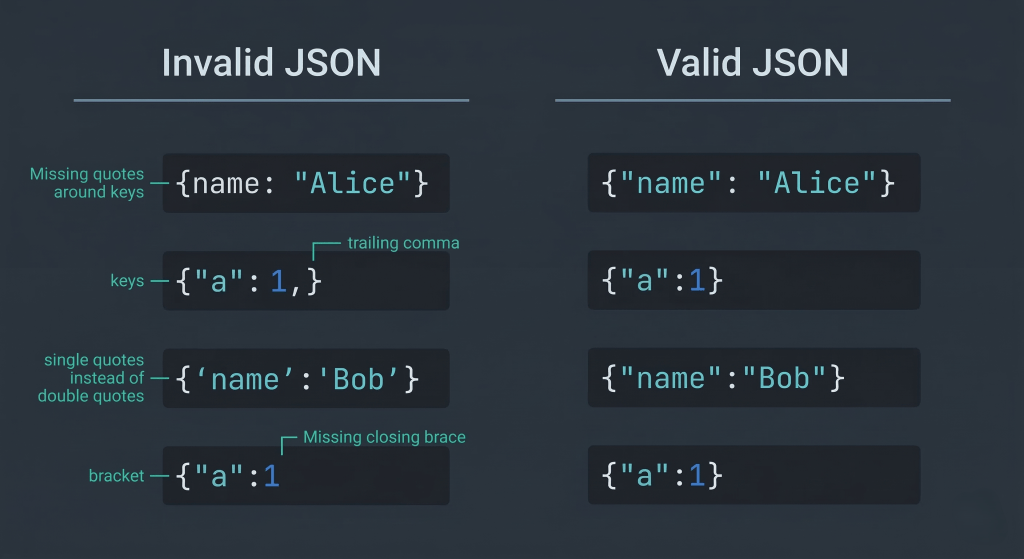
JSON (JavaScript Object Notation) is a lightweight format for structured data exchange. It uses key–value pairs and arrays, and it’s everywhere — REST APIs, config files, webhooks, logs.
Quick example:
{
  "user": {
    "id": 42,
    "name": "Alice",
    "roles": ["admin", "editor"]
  }
}
One thing worth noting: JSON is strict. A missing comma, an extra bracket, or a single quote instead of a double quote — any of these will break parsing entirely.
Why JSON Formatting Is Important
When JSON is transmitted over a network, it’s usually minified to cut down payload size. That’s fine for machines. Not so great for humans trying to debug something at 2am.
Minified version:
{"user":{"id":42,"name":"Alice","roles":["admin","editor"]}}
A formatter takes that and adds indentation, line breaks, and structure — so you can actually see what’s going on. It also validates syntax, which means you immediately know if something is broken before you start guessing.
Where I Actually Use This
API Responses
Most REST API calls return nested JSON. If the response is compressed or if you’re logging it raw, it’s a nightmare to read. Paste it into a formatter first, then look for the field you care about.
Config Files
package.json, tsconfig.json, firebase.json — all JSON, all sensitive to syntax. If something breaks after an edit, formatting + validation is step one.
Webhooks
Stripe, GitHub, Slack — webhook payloads can get complex fast. I always format the raw payload before trying to trace an issue through it.
How It Works Under the Hood
The core logic is pretty simple:
- Parse the raw input string as JSON
- If it’s invalid, throw an error immediately
- If it’s valid, re-serialize it with indentation
In JavaScript:
function formatJSON(input) {
  const parsed = JSON.parse(input)
  return JSON.stringify(parsed, null, 2)
}
The null, 2 in JSON.stringify sets 2-space indentation. That’s really all a basic formatter is doing — parse, validate, reformat.
Before and After
Minified:
{"name":"kbwen","tools":["json","quant","dev"],"active":true}
Formatted:
{
  "name": "kbwen",
  "tools": [
    "json",
    "quant",
    "dev"
  ],
  "active": true
}
Immediately obvious that tools has 3 items. You couldn’t even tell that without formatting.
Try It
I put together a browser-based tool that handles formatting, minification, and syntax validation:
JSON Formatter → https://lab.kbwen.com/dev/json-formatter
It runs entirely client-side — nothing gets sent to a server, so it’s fine to paste internal API responses or config snippets you wouldn’t want uploaded anywhere.
A Few JSON Rules Worth Remembering
- No trailing commas (this trips people up constantly)
- Keys must use double quotes — single quotes aren’t valid JSON
- No comments allowed in standard JSON
- Invalid JSON will fail silently in some parsers and loudly in others — always validate
Wrapping Up
JSON formatting is one of those things that seems minor until you’re staring at a 400-field API response trying to find a single key. Having a formatter open in a tab just removes that friction.
If you work with APIs or config files regularly, keep a formatter bookmarked. It’s a 5-second step that saves a lot of squinting.
